
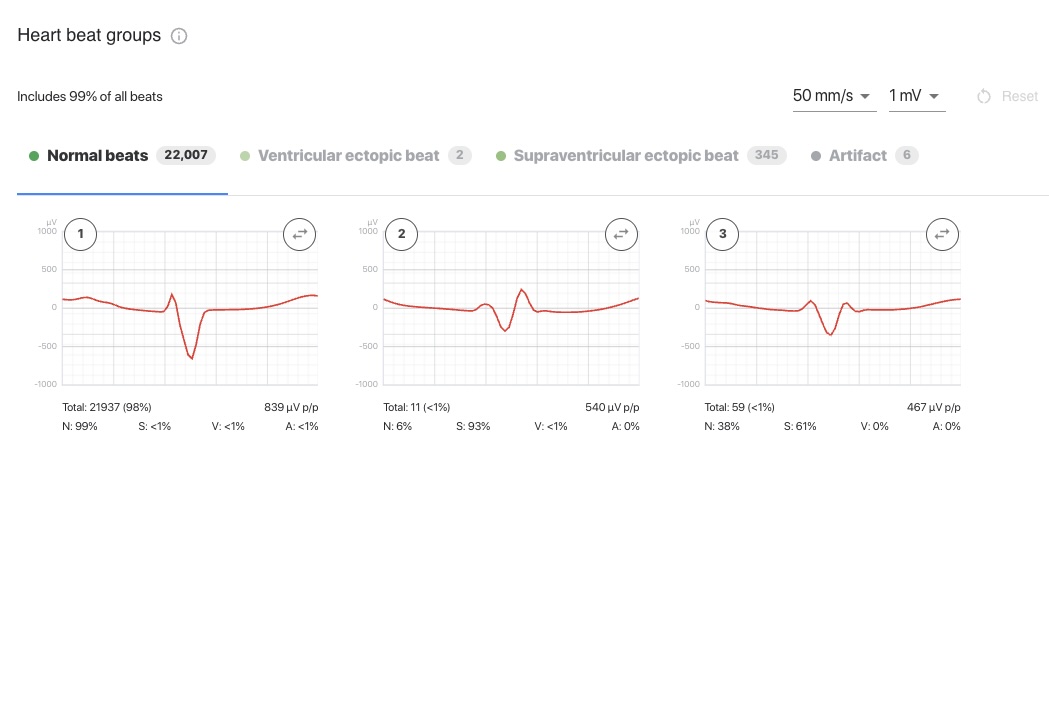
ECG247 now automatically groups heartbeats by QRS morphology. With a single click, you can reclassify an entire group, and all of its beats are moved to the correct category at once. This makes reviewing long-term recordings faster and more reliable.
Beats with similar shapes grouped together
A long-term recording can contain hundreds of thousands of heartbeats. The new feature groups beats with similar QRS morphology, so you can review many beats at once.
For each group, you can see:
- a representative waveform of the beats in the group, with adjustable paper speed (e.g. 50 mm/s) and amplitude (e.g. 1 mV)
- how many beats the group contains, and what share of all beats it represents
- the peak-to-peak amplitude (µV p/p)
- how the beats in the group are distributed across the categories normal beats (N), supraventricular ectopic beats (S), ventricular ectopic beats (V) and artifacts (A)
Reclassify an entire group with one click
Automatic classification is not always correct. Beats with the same shape can end up in different categories, for example when a group of ventricular ectopic beats is partly interpreted as normal beats. You can now correct this directly in the group overview:
- Select the group you want to change.
- Click the button to change the group’s category.
- Select the correct category. All beats in the group are moved there at once.
Groups you have changed are marked as manually modified, so it is easy to see what has been adjusted. If you want to start over, you can discard all manual changes and restore the original automatic classification.
While the test is in progress, groups and counts are updated automatically as new data are recorded. Manual reclassification can be done once the test has been completed.
Faster review and more accurate counts
- Less time per recording: Review a few groups instead of thousands of individual beats.
- More reliable counts: Moving misclassified beats to the correct category gives more accurate counts of supraventricular and ventricular ectopic beats.
- Full control: All manual changes are marked and can be reset.